Transfer Files at Quantum Speed

Secure, lightning-fast file transfer solution for businesses of all sizes and home use. Transfer files of different sizes with military-grade encryption and unparalleled speed. Private and group chats included.

14-day Premium trial: no credit card required • Free version available

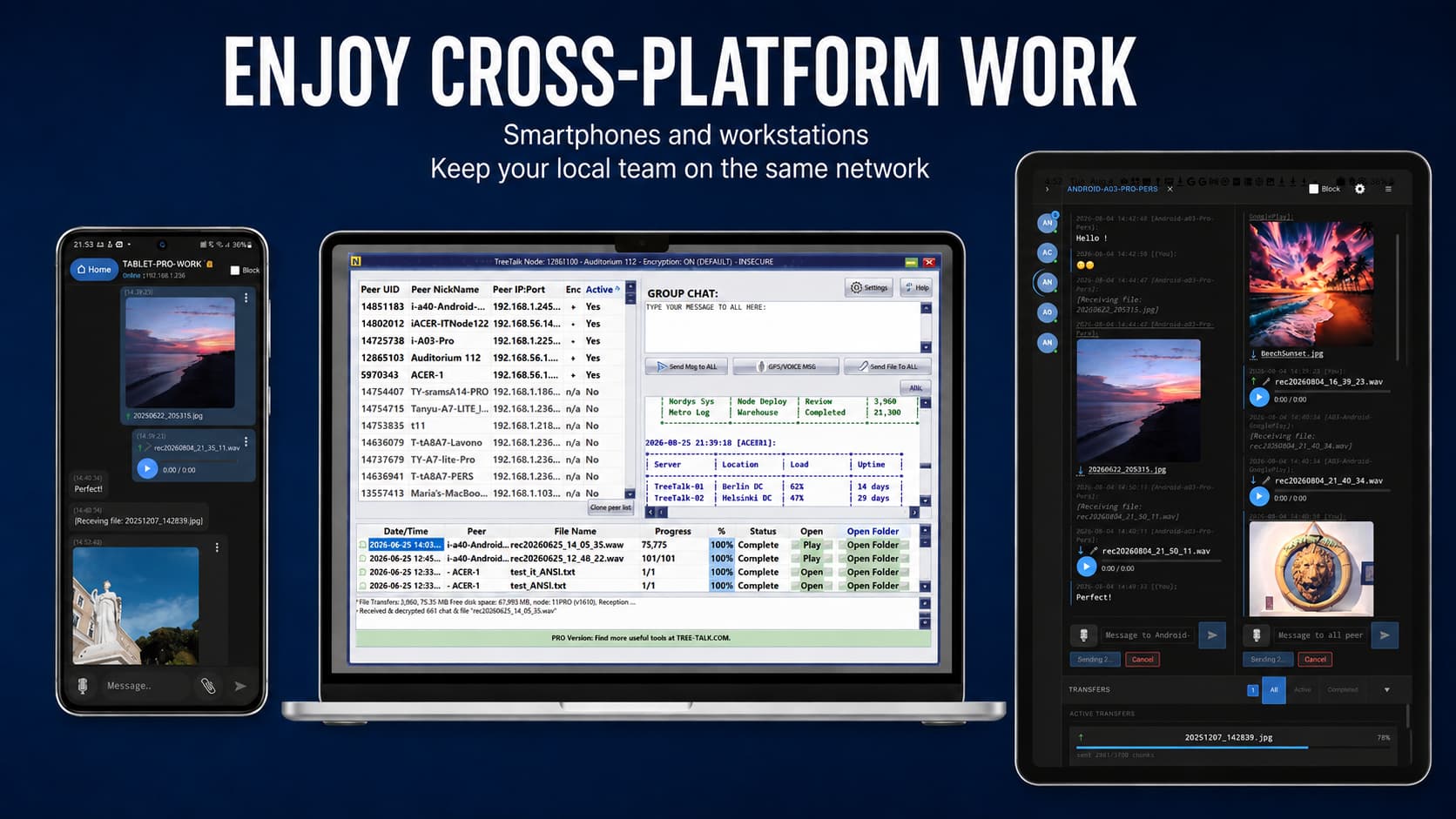
TreeTalk Node Interface

Why TreeTalk Node?

Lightning Fast

Transfer files up to 10x faster than traditional solutions with our proprietary acceleration technology.

🔒

Bank-Level Security

End-to-end encryption ensures your files are protected with military-grade security protocols.

🔗

Local Network Only

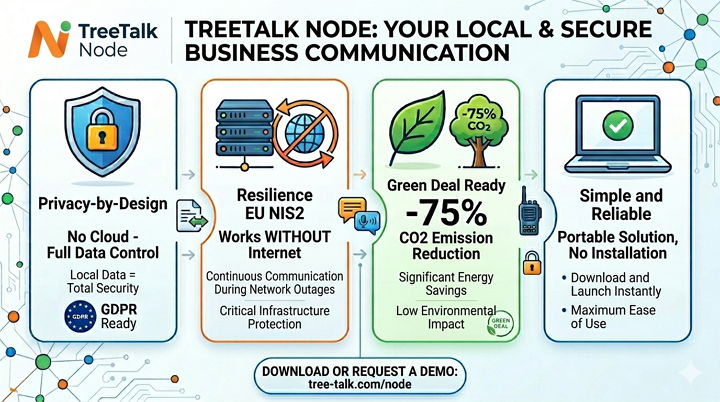
Transfer files securely over LAN, WiFi, or VPN without relying on external servers or internet connectivity.

💬

Additional Capabilities

Group and direct chat, strong end-to-end encryption, drag-and-drop, notifications, and DeepWork no-disturbs mode.

🖥️

Wide Compatibility

Works on Windows starting with version 7 SP1. Full compatibility across all major desktop and mobile platforms.

Simple, Transparent Pricing

Free

$0
/month

Recommended for home use and small teams / SOHO

  • Up to 5 active peers
  • File size up to 100 MB
  • Free trial 14 days for Premium features
  • Community support
Get Started

Premium

$9.95
/month*

Recommended for medium-size teams; VPN, Internet-connected PCs

  • Free trial 14 days
  • Drag-and-drop for multiple files
  • Deep Work mode
  • File size up to 55 GB
    (depends on your PC OS)
  • Standard email/ticket support
  • Up to 300 active peers
  • 1 PC license key

Enterprise

$79.95
one-time*

Same as Premium Offline + extended individual support

  • Same as Premium Offline
  • Extended individual support
Contact Sales

See TreeTalk Node in Action

Watch our product video to see how TreeTalk Node can transform your file transfer workflow

Download TreeTalk Node

Get started by downloading the app on your preferred platform

Ready to Transform Your File Transfers?

Experience how simple and fast secure file sharing can be with TreeTalk Node.
* The product is in the final stage of beta testing. A special reduced price is indicated here upon payment and placement of a pre-order.**

Frequently Asked Questions

1 Do I need the Internet or a server to use TreeTalk Node?

No. TreeTalk Node works entirely inside your local network.

It does not require the Internet, cloud accounts, or a central server.

All file transfers and messages stay within your LAN, WiFi, WiFi Halow, or VPN — ensuring maximum privacy, speed, and reliability, even in offline or isolated networks.

2 Will TreeTalk Node work on older Windows systems like Windows 7?

Yes. TreeTalk Node supports Windows 7 SP1 and newer versions, including Windows 10 and Windows 11.

It is optimized for mixed environments where old and modern PCs operate together — making it perfect for offices, warehouses, schools, and home networks with diverse hardware.

3 Is TreeTalk Node safe to use for sensitive files?

Absolutely.

TreeTalk Node keeps all transfers strictly inside your network and offers optional end-to-end encryption for additional protection.

No data is sent outside, no external servers are involved, and you stay fully in control of your files.

4 Do I need to install anything or configure networks?

No installation and no configuration required.

TreeTalk Node is a portable application:

  • download it,
  • run it on your devices,
  • and it automatically discovers peers in your LAN.

No drivers, no firewall tweaking, no IT setup — it just works.

5 How fast is file transfer in TreeTalk Node?

Transfers use the full potential of your LAN, WiFi, or VPN speed, without bottlenecks from cloud services or protocol overhead.

Files move directly between computers, typically much faster than email, messengers, SMB shares, or USB drives — especially for large files.

6 How to Share Large Files on a Local Network (LAN) or Wi-Fi Network

To transfer large files ranging from hundreds of megabytes to several gigabytes (such as CAD files, Full HD videos, or 4K Ultra High Definition / Full 4K DCI movies), it is convenient to use TreeTalk Node.

Simply drag and drop the file onto the recipient’s nickname, into a group chat, or use the “Send File” button. The file will be sent directly to the recipient’s computer(s) without using the internet. This method is significantly faster and more secure than using cloud storage services, especially for use in critical infrastructure and air-gapped networks.

7 How to Transfer Large Files Over the Internet

To transfer heavy files (from hundreds of megabytes to several gigabytes, such as CAD files, Full HD videos, or 4K Ultra High Definition / Full 4K DCI movies) over the internet it is recommended to use TreeTalk Node together with a VPN.

A VPN (Virtual Private Network), such as OpenVPN or SoftEther, connects your devices and adds an extra layer of security through encryption. TreeTalk Node treats this VPN connection as a local network and discovers other devices as if they were located on the same LAN.

After that, simply drag and drop the file onto the recipient’s nickname, into a group chat, or use the “Send File” button. The file will be delivered directly to the recipient’s computer(s), without using cloud services or online storage — making the transfer faster and more secure.