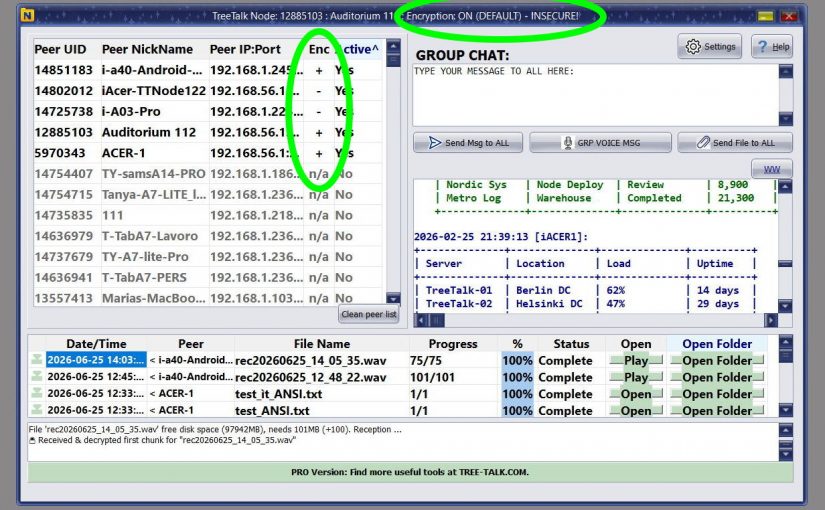
TreeTalk Node 1.22: Secure-by-Default Local File Sharing, Better LAN Messaging, and Clearer Encryption Status
TreeTalk Node 1.22 is a practical release.
No theatrical reinvention. No features added to look good in a demo. No roadmap item invented without real evidence.
The June Release fixes the small decisions that shape real work. Group text messaging works better. Large-group message distribution is faster. Private chats are easier to read. Long user names no longer get cut off. Input fields are more comfortable to type in. Encryption status is now visible at the moment users actually need to see it.
For new installations, end-to-end encryption is enabled by default.
The common thread: every change came from real user feedback. People used TreeTalk Node in offices, laboratories, VPN environments, warehouses, and internal networks. They described where friction appeared. Version 1.22 is the answer.
Why This Release Matters
TreeTalk Node is built for teams that need to share files, exchange messages, and coordinate inside local or private networks without depending on cloud servers or internet access. It works across LAN, WiFi, WiFi Halow, and VPN environments using a serverless peer-to-peer model: files and messages move directly between devices.
That architecture already separates TreeTalk Node from conventional cloud messengers and file-sharing platforms. It is useful when teams need local-only data flow, faster internal transfers, fewer external dependencies, and communication that continues during an internet outage.
But architecture alone is not enough.
Security software fails when users cannot see what is happening. Collaboration software fails when small interface details slow people down throughout the day. Compliance workflows fail when tools depend on users remembering one checkbox in a settings panel they opened two months ago.
TreeTalk Node 1.22 addresses those details.
The release improves how local groups communicate, how users read and write messages, and how teams understand encryption status before sending sensitive data. For IT managers, security managers, system administrators, and compliance teams, these are not cosmetic changes. They affect daily behavior.
Built From Real User Feedback
The most important signal in this release is not a single feature. It is the pattern behind it.
The 1.22 changes came from people using TreeTalk Node in practical environments: teams sending messages inside local network groups, users working with long names in private chats, people typing often enough to notice that input fields needed a larger font, security-conscious users who wanted clearer encryption visibility, and advanced users who understood that encryption is necessary for sensitive data but may be intentionally disabled for trusted, isolated internal networks with very large non-confidential transfers.
That feedback matters because enterprise communication tools fail in unglamorous places. A truncated name makes it harder to confirm the right contact. A hidden encryption setting lets users assume something is protected when it is not. A small input field makes routine communication feel unnecessarily tiring.
Security and usability are not separate departments in a user’s thinking. They meet at the moment someone decides what to send, where to send it, and whether it is safe to do so.
Better Group Text Messaging
Version 1.22 improves text sending inside local network groups.
Group messaging is important in TreeTalk Node because many real use cases are operational rather than social. A hotel team coordinates reception, maintenance, and housekeeping. A warehouse office circulates updated packing lists during an internet outage. A medical laboratory keeps staff aligned while files move across a private connection.
The 1.22 improvement makes group messaging smoother for teams using TreeTalk Node as a local network messenger or offline internal communication tool.
Faster Group Message Distribution
The internal broadcasting system has been redesigned to deliver messages to large groups faster and more efficiently.
This matters in larger networks. A small team of three people will rarely notice the difference between a basic group message model and a more efficient broadcast path. A larger internal network will.
In local-first collaboration tools, performance is not limited to file-transfer speed. A message about a changed process, a transferred file, a status update, or an internal incident needs to reach people quickly. TreeTalk Node 1.22 moves further in that direction.
Improved Private Chat Usability
Private chat has been refined in the June Release, including a change users asked for directly: long user names now display in full instead of being cut off.
This sounds minor until it affects the wrong workflow.
In enterprise environments, names are rarely short. Users may include department names, workstation labels, role-based identifiers, branch names, or location hints. A truncated peer name creates uncertainty, particularly in larger teams or VPN-connected networks where several contacts may look similar at a glance.
Showing the full name reduces ambiguity. It also supports safer communication. Before sending an internal message, a voice note, or a file, the user should be able to confirm the recipient without guessing. This is one of those quiet usability fixes that also has a security dimension.
Larger Input Font for More Comfortable Typing
TreeTalk Node 1.22 increases the font size in input fields.
That is not a headline feature. It is still worth noting because it reflects the product’s direction.
Internal communication tools are used in the middle of other work: diagnostic software, logistics documents, accounting dashboards, production tools. Small text adds friction. A larger input font reduces the low-level irritation that accumulates in operational software used throughout the day.
Encryption Status Is Now Visible in the Peers Table
Version 1.22 adds a new Encryption column to the Peers table.
Users can now see at a glance which contacts use end-to-end encryption and which transmit without it.
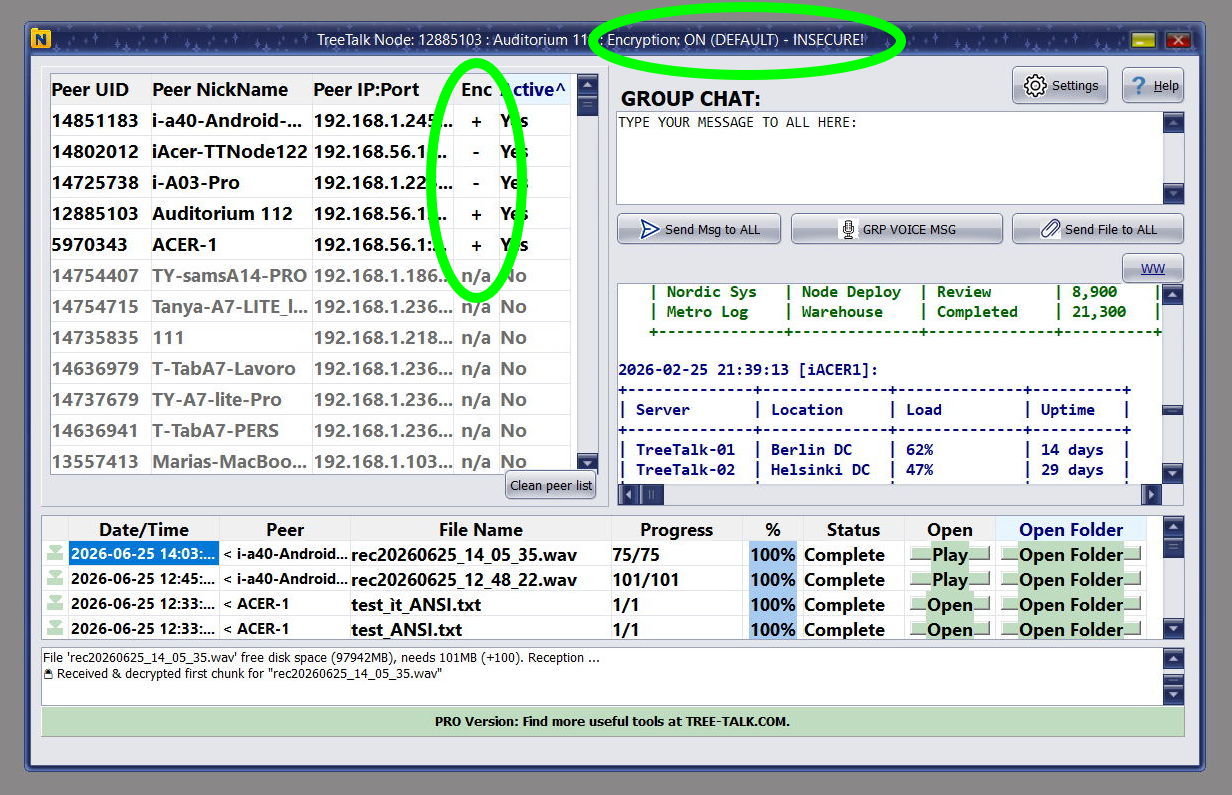
TreeTalk Node 1.22 adds visible encryption status directly in the Peers table, so users can check protection before sending messages or files across a local network.
This is a practical security improvement. It does not hide security state inside a settings menu. It brings that information into the working interface.
Visibility matters in mixed environments. One workstation may be configured for encrypted communication. Another may still use default keys. A third may have encryption intentionally disabled because it is handling non-confidential data across a trusted isolated network and the user wants maximum throughput for very large files.
Without visible status, users must remember or assume. With visible status, they can check before sending.
The better question is not simply “does the product support encryption?” It is “can users understand the encryption state at the moment they make a decision?” TreeTalk Node 1.22 answers that question more directly.
Encryption Visibility Inside Private Chats
The same visibility applies inside private chats. For each contact, the application clearly indicates whether end-to-end encryption is active.
Private chat is where more sensitive information tends to appear: names, customer references, operational instructions, file context, internal decisions.
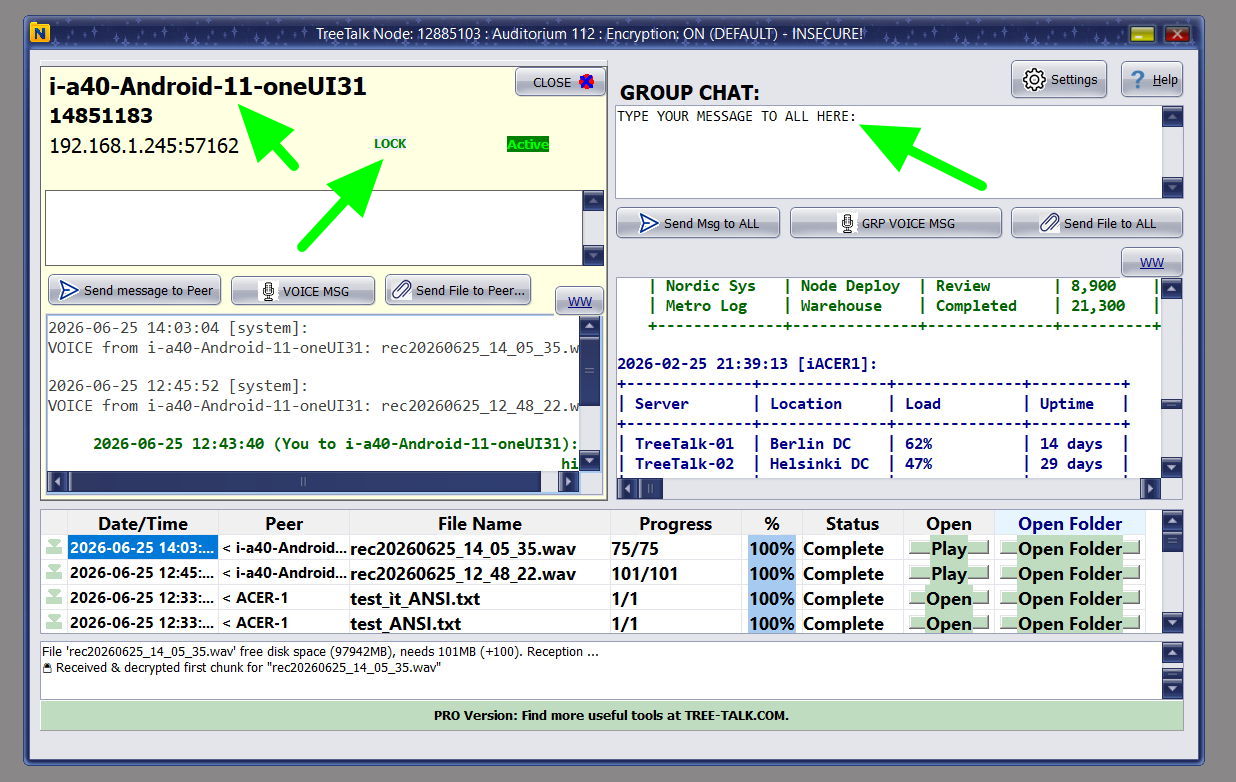
Private chats now show full peer names and visible encryption status, reducing ambiguity before a user sends sensitive files or messages.
From a Zero Trust perspective, visible encryption state helps avoid blind assumptions. Users should not assume that a familiar internal network means every communication path is protected.
Encryption visibility does not replace policy, training, or network controls. It supports them.
For compliance officers and security managers, this is the kind of detail that makes policy easier to follow. If a rule requires sensitive files to travel only over encrypted channels, users need a way to see channel status without consulting documentation.
End-to-End Encryption Is Now Enabled by Default
The most significant change in TreeTalk Node 1.22 is the shift to secure-by-default behavior for new installations.
Previously, end-to-end encryption was disabled by default after installation. Now it is enabled by default.
That change is not about forcing every organization into a single security model. It is about reducing the chance of an easy and common mistake.
Security settings get missed for ordinary reasons. Someone is tired. The office is busy. Setup is done quickly before a meeting. A system administrator is configuring several machines at once. A user downloads a tool, tests whether it works, and plans to return to the security settings later.
Later often does not come.
Secure defaults help because they make the safer path the starting point.
This design approach is also consistent with the data protection by design and by default principle in GDPR Article 25, which expects appropriate technical and organizational measures to be applied from the design stage and as the default. TreeTalk Node should not be described as GDPR certified, because that would be inaccurate. But the reasoning behind secure defaults is compatible with how modern privacy and security programs think: reduce unnecessary exposure, make safer choices easier, and avoid depending entirely on user memory.
Why Default Keys Still Need Warnings
TreeTalk Node 1.22 starts new installations with default encryption keys.
That may sound contradictory. If encryption is enabled by default, why use default keys at all?
The answer is onboarding.
TreeTalk Node is designed to be lightweight and portable. Users should be able to discover peers, send a message, and transfer a file without first building infrastructure. Default keys preserve that fast start.
But default keys are not secure for real data protection. They are a temporary starting point, not a finished security configuration. This is why TreeTalk Node 1.22 provides multiple warnings, including three distinct visual reminders, that default keys should be replaced with keys chosen by the organization.
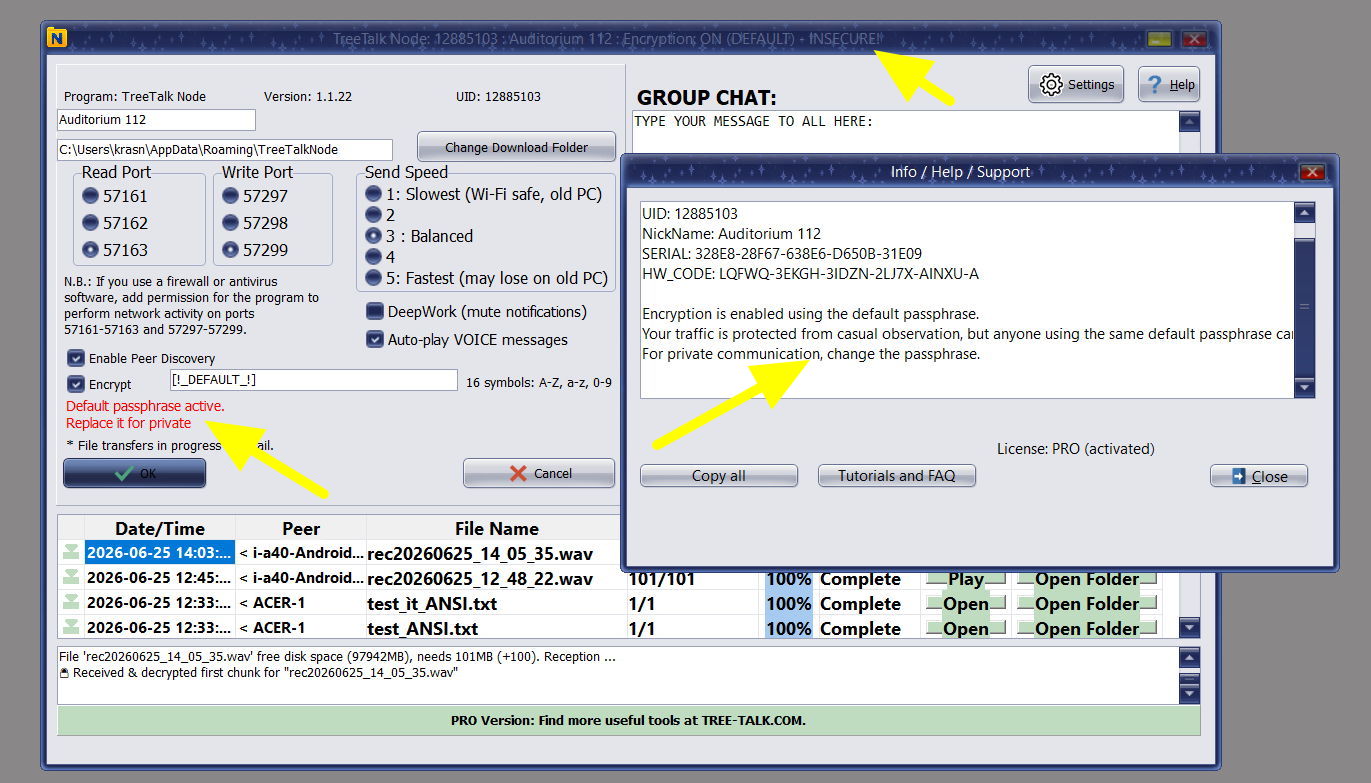
TreeTalk Node 1.22 warns users in several places that default encryption keys are only a temporary starting point and should be replaced with organization-defined keys.
If the software required custom encryption keys before the first test, many users would postpone evaluation or disable encryption to move forward. If the software silently used default keys without warnings, users might believe they had meaningful confidentiality when they did not.
TreeTalk Node 1.22 takes the middle path: start quickly, enable encryption by default, make weak default keys visible, remind users to replace them, and allow advanced users to disable encryption when their threat model supports that decision.
That is secure UX in practical form.
Why Some Users May Still Disable Encryption
Not every internal transfer carries the same risk.
Some advanced users operate in isolated internal networks they fully control and transfer only non-confidential data. In those cases, disabling encryption to maximize performance for very large files is a reasonable decision.
That option should remain available.
Security tools weaken when they pretend one setting fits every environment. A hospital, a design office, a manufacturing line, a hotel back office, a financial institution, and a test laboratory do not share the same threat model.
The better design is to activate the safer default, display security state clearly, warn about weak configuration, and still allow knowledgeable users to make a conscious decision.
The key word is conscious.
TreeTalk Node 1.22 is designed to make forgotten encryption less likely. It does not remove responsibility from the organization. It gives users better information at the moment that responsibility matters.
Relevance for GDPR, DORA, and NIS2 Teams
TreeTalk Node is not a compliance certificate. No file transfer tool substitutes for governance, risk assessment, policies, access controls, incident response, and legal review.
But tool design can support or undermine compliance work.
For GDPR-oriented teams, local-only data flow can reduce unnecessary exposure to third-party cloud platforms when files and messages only need to move inside an organization, a facility, or a private network. Data protection by design and by default is not just a legal phrase. It is a product design discipline.
For NIS2 teams, this release connects with practical cybersecurity risk-management concerns: business continuity, appropriate use of cryptography, secure configuration, and keeping internal communication running when external connectivity is unavailable. NIS2 addresses cybersecurity risk-management measures, incident handling, business continuity, disaster recovery, crisis management, and cryptography policies. TreeTalk Node does not resolve all of those obligations, but its design supports several of them.
For DORA teams in financial services, the relevant themes include ICT risk management, digital operational resilience, third-party ICT risk, and the capacity to maintain operations during disruptions. A local-first architecture can support continuity scenarios where teams need an internal communication and file-transfer path that does not depend on an external cloud service.
The precise claim is this: TreeTalk Node can support compliance-oriented workflows by keeping communication local, reducing cloud dependency, improving encryption visibility, and making safer configuration the starting point for new installations.
That is a practical claim. It is also the one that holds up.
Practical Enterprise Use Cases
Healthcare and Diagnostics
Healthcare teams often need to move sensitive files between nearby workstations, departments, collection points, or connected facilities. TreeTalk Node can help teams share diagnostic files and internal messages across LAN or VPN environments while keeping data inside controlled infrastructure.
Financial Institutions
Banks, insurance organizations, accounting offices, and financial service providers face growing pressure to manage ICT risk and reduce third-party dependency. TreeTalk Node does not replace core banking systems or regulated archival platforms. It can serve a narrower role: secure local communication and file transfer for internal teams, branch offices, or continuity scenarios where cloud tools are unavailable or unsuitable.
Industrial and Manufacturing Networks
Manufacturing environments typically include segmented networks, older Windows machines, operational workstations, large technical files, and restricted connectivity. A portable LAN file transfer and messaging tool can help engineers, operators, and office staff move files or coordinate inside a controlled network.
Government and Public Sector Offices
Public sector teams work with internal documents, citizen-related data, and infrastructure constraints that make uncontrolled cloud sharing a liability. A local-first tool gives IT teams another option for internal communication and file sharing without requiring a new external platform for every transfer.
Hotels, Logistics, and Facilities
Not every secure communication problem resembles a bank audit. A hotel with thick walls, a logistics office during an internet outage, or a facility team coordinating across departments may simply need communication that continues on the local network without depending on anything external.
What Changed in TreeTalk Node 1.22
- Improved group text messaging
- Redesigned group message distribution for faster delivery to larger groups
- Refined private chat usability
- Full display of long user names
- Larger input font
- New Encryption column in the Peers table
- Encryption status visibility inside private chats
- End-to-end encryption enabled by default for new installations
- Multiple warnings that default encryption keys are not secure and should be replaced
- Additional interface refinements across the application
Download TreeTalk Node 1.22
If your team needs secure file transfer, local network messaging, private chat, or internal communication that can work without internet, TreeTalk Node 1.22 is available now.
Start with the free version, test it on your LAN, WiFi, or VPN, and evaluate how it fits your internal communication and file-sharing workflows.
Download TreeTalk Node 1.22:
https://tree-talk.com/tree-talk-node/en/treetalk-node-file-sharing.html
For enterprise deployment, offline licensing, or compliance-oriented environments, contact the TreeTalk team to request a demo.
Suggested FAQ Block
Is TreeTalk Node a secure file transfer tool?
Yes. TreeTalk Node supports secure local file transfer and messaging across LAN, WiFi, and VPN environments. Version 1.22 enables end-to-end encryption by default for new installations and makes encryption status visible in the Peers table and inside private chats.
Does TreeTalk Node work without internet?
Yes. TreeTalk Node is designed for local and private networks. It works across LAN, WiFi, WiFi Halow, and VPN environments without cloud servers or internet dependency.
Is TreeTalk Node suitable for DORA or NIS2 workflows?
TreeTalk Node is not a compliance certification. It can support DORA- and NIS2-oriented workflows by reducing cloud dependency, supporting local-only communication, improving encryption visibility, and helping internal communication continue during connectivity problems.
Why does TreeTalk Node use default encryption keys after installation?
Default keys allow users to test the portable software quickly. They are not secure for real data protection. Version 1.22 provides multiple visual warnings telling users to replace default keys with their own strong passphrase.
Can encryption be disabled?
Yes. Advanced users can disable encryption when they fully trust an isolated internal network and transfer only non-confidential data, for example when maximizing performance for very large files. For sensitive data, encryption should be configured with user-defined keys.