
We’ve normalized something absurd in modern offices. You need to send a 500 MB CAD file to a colleague three desks away. Both computers are connected to the same network. Logic says the file should go straight from one computer to the other.
Instead, you upload it to Dropbox, wait for the link, send the link in Slack, and wait again while your colleague downloads the same file. Or you discover that email won’t accept the attachment. Or you start guessing which shared folder has the right permissions.
The cloud promised to make work easier. For purely local file sharing, it often adds a trip nobody asked for.
Share files, messages and voice notes directly over Wi-Fi, LAN or hotspot. No cloud or Internet required for local communication.
No registration required. Free editions available. Pro licences are one-time purchases.
Why We Built TreeTalk Node
This frustration came from our own work. A small development team, some Windows 7 machines kept for legacy testing, other workstations running Windows 11. We kept moving builds, logs, documentation and design files between them. We didn’t need another synchronized folder. We needed to send a file to a specific person, right now.
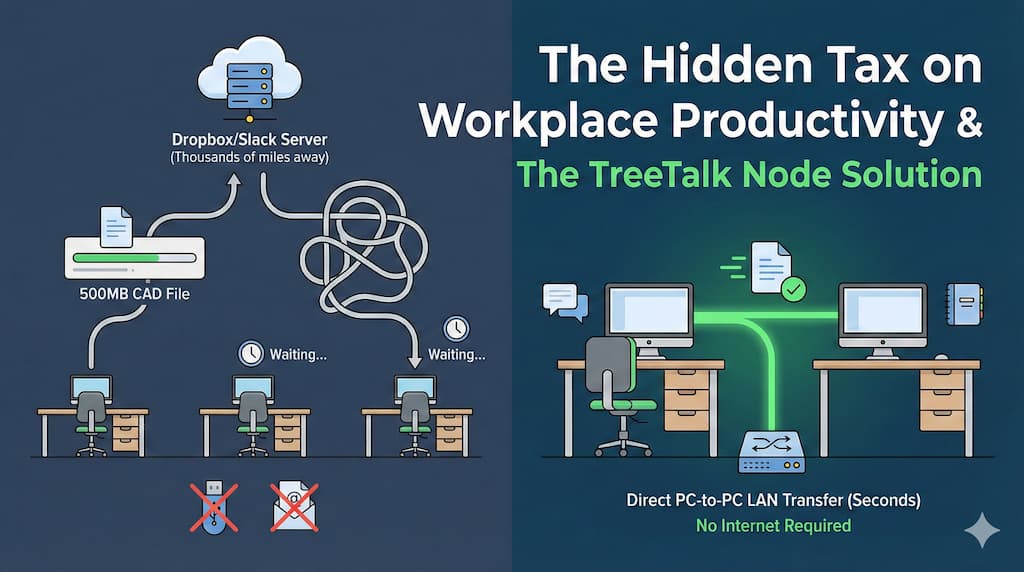
Cloud tools have their place. Synchronizing work across countries, maintaining version histories and sharing public links are legitimate reasons to use them. But if two devices are already on the same network, that entire workflow can be excessive. Like using a forklift to move a coffee cup.
Network shares (SMB) can be excellent once configured, but finding the right PC and sorting out permissions isn’t always the job of the person sending a file. FTP servers and NAS appliances solve other problems and need some administration. Folder-sync software is useful for continuous replication, not necessarily for sending one updated drawing to one colleague.
We wanted to open an app, see “Bob – Production” in the peer list, drag the file and send it. That’s how TreeTalk Node started: a direct, serverless local file transfer and messaging tool.
How Local File Sharing Works in TreeTalk Node
Each device runs its own instance. TreeTalk Node discovers other reachable peers on the LAN, Wi-Fi network, phone hotspot or suitably configured VPN. Users see nicknames rather than computer names or IP addresses. Files, messages and recorded voice notes travel between the selected devices, not through a TreeTalk storage server.
That changes the math. A local transfer is limited by the actual local path, such as Ethernet, Wi-Fi, disk performance and the endpoints themselves. A cloud round-trip can also be limited by Internet upload speed, cloud service throttling and the second download. This doesn’t mean TreeTalk Node is automatically faster than an optimized SMB share. It means that a local file no longer has to take an unnecessary external route.
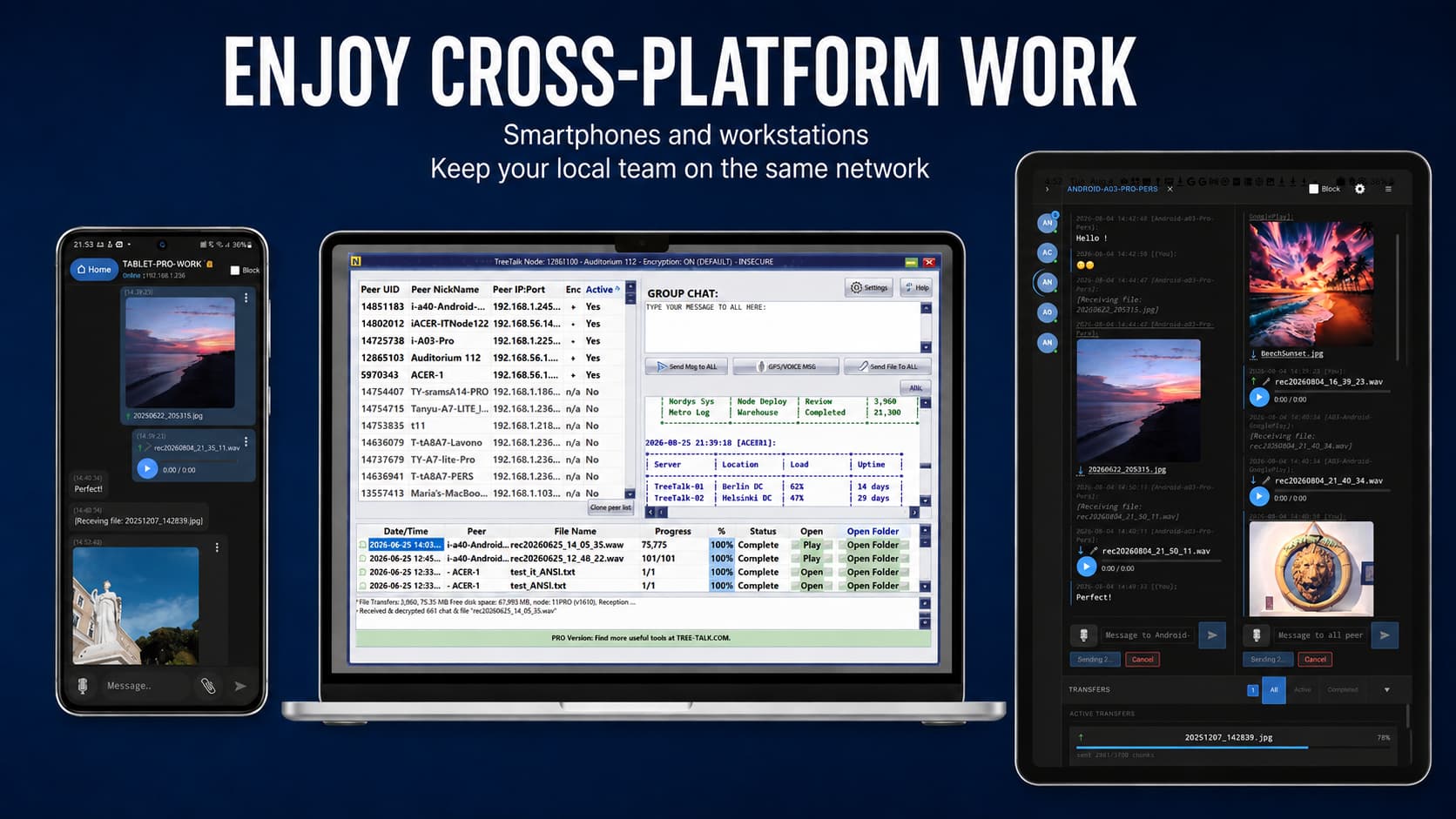
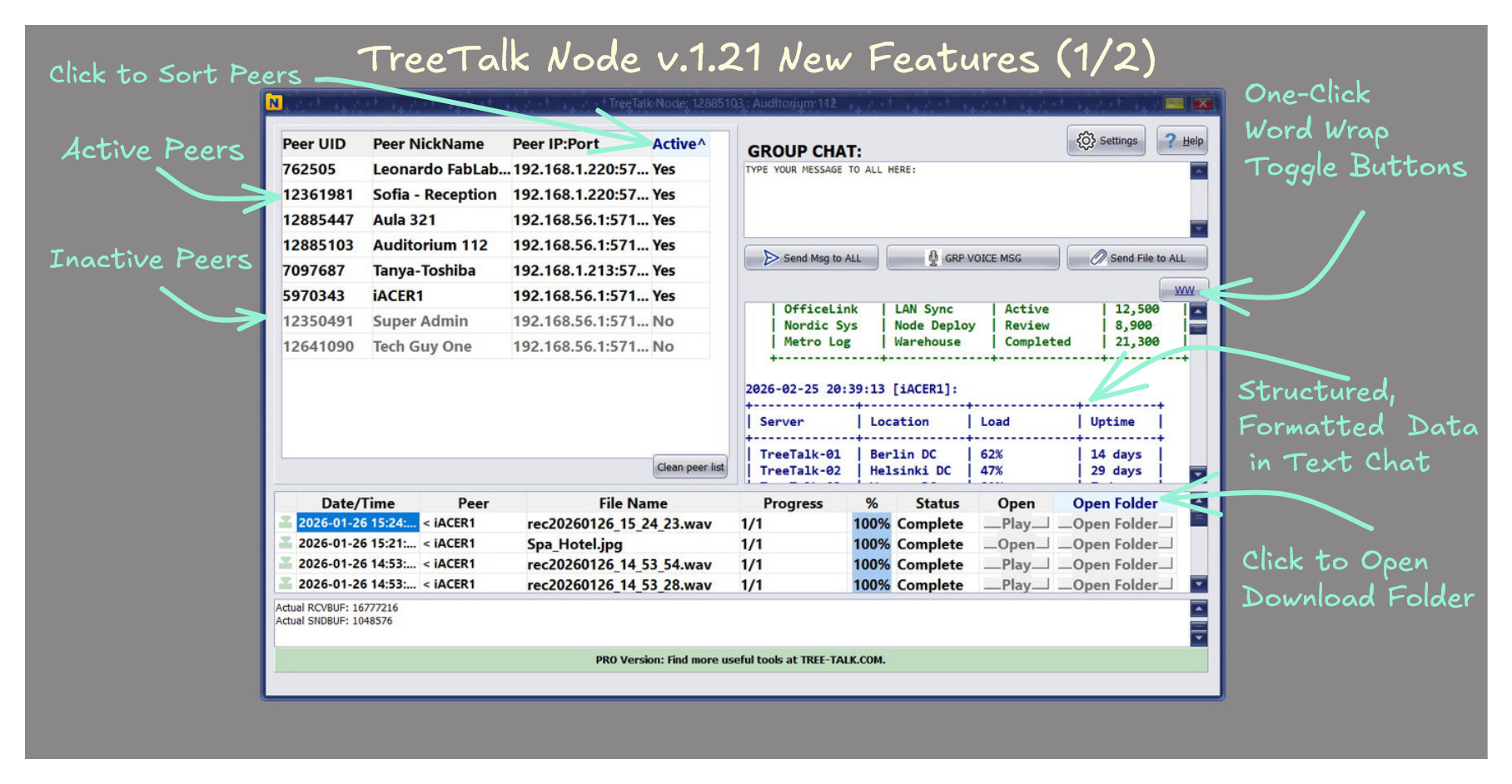
The file journal shows sent and received files, their peer, progress and status. Chat stays alongside the transfer, so you can send “Updated drawing, version 3” without opening a separate messenger. When the Internet connection fails, those local functions can continue as long as the participating devices and local network remain available.
The Windows edition is available as a portable executable for Windows 7 SP1 and newer. Windows 10 and 11 users can also install it from Microsoft Store. That distinction matters in factories, laboratories and small offices where replacing every older computer is not realistic.
Watch the Windows workflow in the original 90-second demonstration, or open the Windows tutorial for more detailed setup instructions.
A Major Change Since This Article Was First Published: Android Is Here
When we wrote the first version of this article in November 2025, TreeTalk Node was a Windows project. That description is now out of date. On July 7, 2026, the Windows application reached Microsoft Store. In August, the Android Free and Pro editions arrived on Google Play.
Now you can send a document from a Windows workstation to an Android phone, or select a batch of holiday photos in Android Gallery and use Share → TreeTalk Node to send them to another phone or a Windows PC. A shared hotspot can be enough. The hotspot doesn’t even need an active Internet connection for local exchange.
This has turned out to be useful beyond office workflows. Think of a temporary event, a field crew, a workshop, or a family sharing photos when mobile coverage is poor. The same peer-to-peer protocol handles private chat and group communication, too. It’s more than a replacement for a USB stick.
There are limits worth understanding. Android Free remains usable with single-file transfers up to 100 MB and ordinary text chat, and offers evaluation allowances for multi-file and outgoing voice messaging. Android Pro is a separate paid app that allows larger files, regular multi-file sending and unlimited outgoing voice notes. Both work with compatible Windows nodes. See the Android guide and Free/Pro comparison.
Where This Helps in Practice
Creative and Development Teams
CAD assemblies, video exports, software builds, logs and design archives can be large, and they are often needed by one colleague rather than the entire company. Local peer discovery and direct sending remove the intermediate upload. If some devices are in another office, a correctly configured VPN can connect them, but remote transfer speed still depends on the Internet link.
Manufacturing, Warehouses and Logistics
Production schedules, quality reports, inventory files and shipping manifests still have to move when a site’s Internet access is unreliable. TreeTalk Node can exchange them over an existing local network. Windows 7 support also matters here. We cannot pretend every factory will upgrade every control workstation just to run a messenger.
Healthcare, Professional Offices and Regulated Work
Local-only routing can reduce exposure to external file-hosting services when teams exchange scans, documents or confidential case material. Application-level encryption is available, but the passphrase, access rights, endpoint security and records still need to be managed. Software architecture can support GDPR or HIPAA-related requirements; it does not certify the organisation using it.
Schools, Training Rooms and Temporary Groups
A teacher can share teaching materials across the classroom network without provisioning a cloud account for every PC. For a short-lived workgroup, phone hotspot or event, devices can discover one another and exchange files and messages locally. Group sending and voice workflows depend on edition limits and device capabilities.
The Data Sovereignty Advantage, and Its Limits
One fact matters more to me than a dozen privacy slogans: during ordinary peer-to-peer communication, TreeTalk Node does not need to store your file on an outside server. No TreeTalk cloud account is involved. If the devices are connected locally, the data can remain on the network you manage.
That is useful for an office with sensitive customer records, an air-gapped lab or a team trying to keep working through an Internet outage. But local routing doesn’t protect an infected laptop or a folder with weak permissions. And if you connect distant offices by VPN, the packets still cross the external network inside the configured tunnel.
For sensitive use, set a unique strong encryption passphrase, verify the intended peers and protect received files on disk. That’s a more serious security policy than saying that any product is “completely safe.”
Free, Pro and the Cost of Avoiding Cloud Detours
You can test the basic workflow before buying anything. Windows Free permits up to five active peers and files up to 100 MB. Windows Pro raises those limits to up to 300 active peers and 55 GB files, and adds functions such as multi-file drag-and-drop and Deep Work mode. Windows Pro is sold as a one-time licence for one PC, currently listed at US$19.95, with optional paid support. The Windows distribution channels also offer a 7–14 day Premium evaluation, depending on the route used.
Android Free and Android Pro have their own terms. Pro is a separate one-time Google Play purchase, with a reference price of roughly US$9.99 or €9.99 plus applicable taxes. Android Pro is not a Windows licence, and it does not automatically upgrade the Free Android installation. See the official product and pricing page before purchasing.
What We Are Still Learning
Our goal hasn’t changed: a file should take the shortest reasonable route to the person who needs it. But adding Android introduced new practical questions. Wi-Fi client isolation, firewall rules, Android background power management and different Free/Pro limits matter just as much as the protocol itself. These are the things we’re improving with real users, not hiding behind an “it just works” slogan.
If TreeTalk Node fails to discover another device, begin with the network: check that both devices can actually reach one another, that guest Wi-Fi isolation is off and that firewalls permit the app. The Windows help page and Android help page cover the common cases. We also still read feedback through our one-minute product survey.
Frequently Asked Questions About Local File Sharing
How can I share large files over a LAN or Wi-Fi network?
Run TreeTalk Node on the sending and receiving devices and connect them to the same reachable LAN or Wi-Fi network. On Windows, drag a file onto the recipient in the peer list or use the Send File control. On Android, select the file in Gallery or your file manager, tap Share, and choose TreeTalk Node. The transfer goes directly between peers without first uploading to cloud storage. The permanent Free editions have a 100 MB individual-file limit; Pro editions support files up to 55 GB, subject to device and network conditions.
Can I transfer photos or videos from Android to Windows, or to another Android phone, without cloud storage?
Yes. TreeTalk Node for Android can exchange files and messages with compatible Windows and Android devices on a reachable Wi-Fi network, LAN, VPN or phone hotspot. You can send from the Android Share menu and follow progress in the Transfers tab. Multi-file sending is included in Pro and can be evaluated within the Free edition’s allowance.
Does TreeTalk Node work without the Internet, a server or a cloud account?
Yes, for normal local communication. A LAN, private Wi-Fi network or phone hotspot is enough, even when it has no Internet connection. TreeTalk Node does not need a central TreeTalk file server or user account to exchange local files, text or voice messages. Downloading, installing from an app store and getting updates are separate activities that may require Internet access.
How do I transfer large files between offices over the Internet?
Use a properly configured VPN, such as OpenVPN or SoftEther, that makes the participating devices reachable and permits TreeTalk Node traffic and discovery. Files then travel between peers through that VPN, without TreeTalk cloud storage. Transfer speed depends on the offices’ Internet upload and download capacity, VPN overhead and network configuration; a VPN cannot turn a slow remote link into a gigabit LAN.
Does TreeTalk Node work on Windows 7, Windows 10, Windows 11 and Android?
Yes. The portable Windows edition supports Windows 7 SP1 and newer, including Windows 10 and 11. There is also a Microsoft Store installation route for Windows 10 and 11. Android Free and Android Pro are publicly available on Google Play, and Android and Windows can communicate with each other. macOS and iOS should not be treated as generally available editions at present.
What are the Free and Pro file-size limits?
For Windows, the permanent Free edition allows files up to 100 MB and up to five active peers. Windows Pro supports files up to 55 GB and up to 300 active peers, with additional functions such as multi-file drag-and-drop. On Android, Free also has a 100 MB individual-file limit; Pro supports files up to 55 GB, multi-file sending and unrestricted outgoing voice messaging. The receiving device also needs an edition capable of accepting the file. The 55 GB figure is a supported maximum, not a promise that every device can complete such a transfer.
Are TreeTalk Node Free and Pro subscriptions?
The Free editions remain free within their limits. Windows Pro is offered as a one-time licence for one PC, with optional separately priced support; the published reference price is US$19.95. Android Pro is a separate one-time Google Play purchase, with a reference price around US$9.99 or €9.99 plus applicable taxes. Buying Android Pro does not activate Windows Pro, and installing Android Pro does not convert the Android Free app into Pro. Check the official pages for the current local checkout price and licence terms.
Can I safely send sensitive files, and does this automatically make my organisation GDPR or HIPAA compliant?
TreeTalk Node avoids third-party content relay and offers application-level encryption, which can help an organisation keep control of where files travel. Before sharing confidential data, configure a strong unique passphrase consistently across devices, verify the recipient and secure the receiving folder and endpoints. Using local-only software does not by itself establish GDPR or HIPAA compliance: the organisation still needs the appropriate access controls, policies, legal basis and records.
Do I need to install software or change firewall settings?
The Windows direct-download edition is portable: extract the ZIP and run the executable, without a conventional installer. Alternatively, Windows 10/11 users can install it from Microsoft Store. Android uses a normal app installation. Peer discovery usually needs little setup, but a Windows firewall rule, Android permissions or network configuration may need attention. Guest Wi-Fi networks with client isolation often block device-to-device communication.
How fast is TreeTalk Node compared with cloud uploads or Windows network shares?
It avoids sending a local file up to a remote cloud service and then downloading it again, so local transfers can save considerable time when Internet upload bandwidth is limited. Actual speed depends on the sender, receiver, Wi-Fi or Ethernet link, disk and network conditions. TreeTalk Node is not guaranteed to beat a well-configured SMB share or an external SSD, and no single transfer-speed figure applies to every setup.
Can I send the same file to a group and use chat or voice messages?
Yes. TreeTalk Node combines direct file sharing with private and group text communication and recorded push-to-talk-style voice messages. Group sending is available where the edition supports it. Android Free includes evaluation allowances for up to 30 outgoing voice messages and up to 30 individual files in the multi-file workflow; after those allowances, normal text chat and ordinary single-file sending remain available within Free limits.
More information: TreeTalk Node official product page, Windows download and Android download.
TreeTalk builds communication tools for networks where privacy and independence matter. We started with a very ordinary question: why is sending a file across the room sometimes harder than sending it around the world?