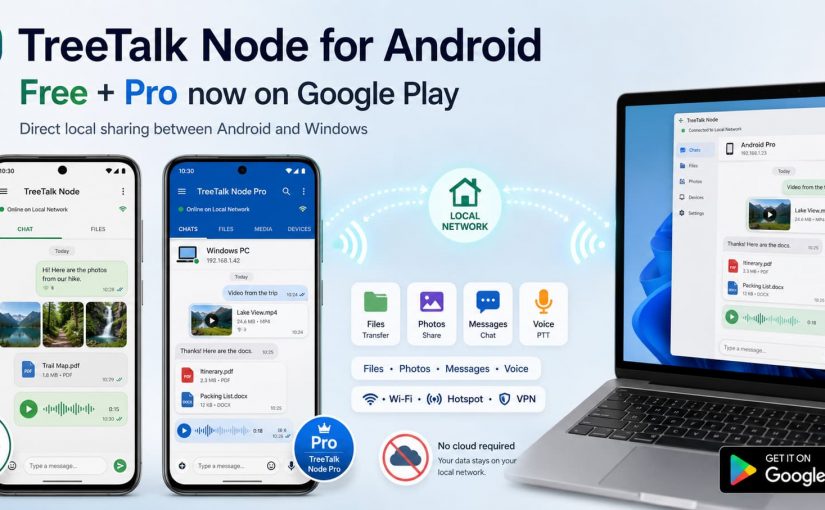
On August 18, TreeTalk Node added its second Android application to Google Play.
TreeTalk Node Free had already reached Google Play at the beginning of August. Now TreeTalk Node Pro is there as well, giving Android users a choice between a permanent Free edition and a separate paid Pro application.
Both communicate with TreeTalk Node on Android and Windows over the same reachable Wi-Fi, LAN, VPN or phone hotspot.
The basic idea has not changed: when the devices are already connected locally, files and everyday messages do not need a cloud detour.
Two Android apps, one communication protocol
TreeTalk Node Free and TreeTalk Node Pro are separate Android applications.
TreeTalk Node Free:
https://play.google.com/store/apps/details?id=com.treetalk.node
TreeTalk Node Pro:
https://play.google.com/store/apps/details?id=com.treetalk.node.pro
Installing Pro does not unlock or replace Free. There is no Android licence key and no Windows-style activation process. The two applications may even be installed side by side.
They use the same TreeTalk Node communication protocol, so Free and Pro devices can discover and communicate with compatible peers on the same reachable network.
That also includes Windows PCs running TreeTalk Node.
What can you do with TreeTalk Node on Android?
The Android interface was designed around normal phone and tablet workflows rather than copying the Windows application.
You can share files from the Android file picker, send material from Gallery, exchange text messages, record voice messages and communicate privately or through the common group feed.
Sharing a video directly from the Android Gallery to another Android device with TreeTalk Node.
Images can appear as previews inside the conversation.
The Windows version keeps its more compact desktop interface.
Different interfaces make sense on different devices. The useful part is that the phone, tablet and workstation still speak to each other.
Android-to-Windows file transfer without cloud storage
A common workflow is very simple.
An Android phone and a Windows notebook are connected to the same Wi-Fi network.
Open TreeTalk Node on both devices. They discover each other automatically as long as the network allows communication between connected devices.
You can then send a photo, document or other file directly from Android to Windows without first uploading it to cloud storage.
The same principle works on a LAN, a user-configured VPN or a phone hotspot.
Internet access itself is not required for normal local communication.
One exception to watch for is guest Wi-Fi. Some guest networks isolate connected devices from each other. TreeTalk Node needs the participating devices to be mutually reachable.
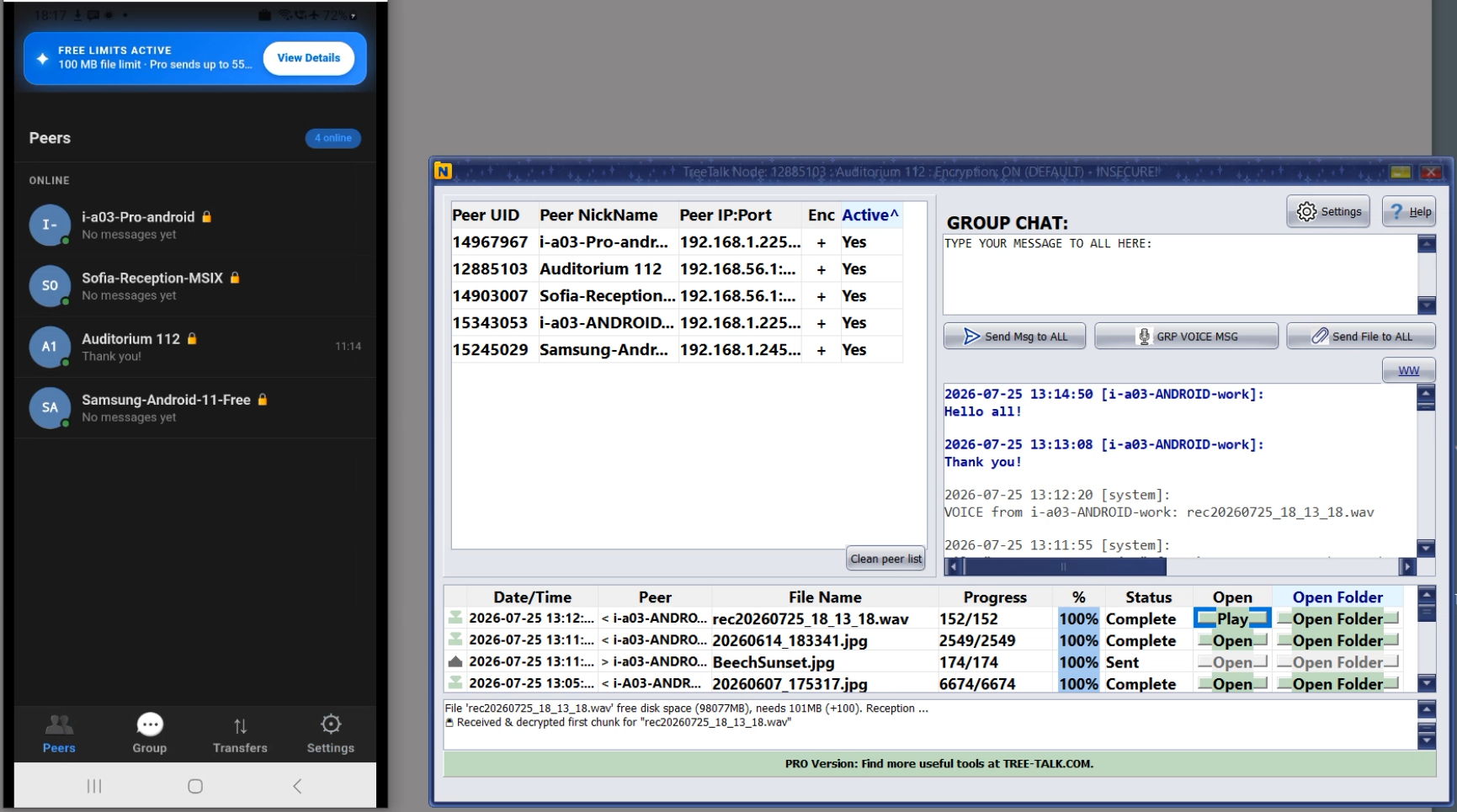
TreeTalk Node Android Peers tab and Windows version
TreeTalk Node Free or Pro?
TreeTalk Node Free is intended to remain useful after its evaluation allowances are exhausted.
The permanent Free edition supports ordinary text messaging and single-file sending, with a maximum individual file size of 100 MB.
The current Free evaluation also lets users try selected Pro-style workflows, including up to 30 outgoing voice messages and up to 30 individual files sent through the multi-file workflow. Those allowances end when their respective quantities are exhausted.
TreeTalk Node Pro removes those Free restrictions for users who need heavier Android workflows.
Pro supports multiple-file sending, unlimited outgoing voice messages and individual files up to 55 GB, subject to the practical limits of the device, operating system and network. It also keeps deeper chat and transfer histories.
This can matter when TreeTalk Node is used for batches of Gallery photos and videos, field documentation, larger work files or frequent voice communication.
A phone hotspot can be enough
TreeTalk Node does not require a conventional router.
One phone can create a hotspot and the other participating Android devices or Windows notebooks can connect to it.
The hotspot does not need Internet access for TreeTalk Node devices to exchange local files and messages.
That makes the same architecture useful in very different situations: an office network, a temporary field team, a workshop, a hotel, a road trip or a group of people sharing photos nearby.
Privacy and encryption
TreeTalk Node does not require a TreeTalk cloud account for ordinary device-to-device communication.
Files, messages and voice recordings are designed to move directly between the selected peers rather than through TreeTalk cloud storage or content-relay servers.
Application-level encryption is available. For sensitive communication, users should set their own strong, unique passphrase and configure participating devices consistently.
The Android cryptographic core uses AES-256-CTR, HMAC-SHA-256 and PBKDF2-based key derivation. Encryption keys stay on the device and are not broadcast over the network.
TreeTalk Node Pro pricing
TreeTalk Node Pro for Android is a one-time Google Play purchase rather than a subscription.
The current reference price is approximately US$9.99 plus applicable tax, or €9.99 plus applicable VAT in European pricing.
Google Play controls the final localized checkout price, tax treatment, refunds and device entitlement.
TreeTalk Node for Android: Free vs Pro
Both editions use the same TreeTalk Node protocol and can communicate with Android and Windows devices on the same reachable Wi-Fi, LAN, VPN or phone hotspot.
| Feature | TreeTalk Node Free Permanent Free edition |
TreeTalk Node Pro Full Android edition |
|---|---|---|
| Price | Free $0 |
One-time purchase Approx. US$9.99 + applicable tax or €9.99 + applicable VAT |
| Maximum individual file size | 100 MB | Up to 55 GB* |
| Files per send action | 1 file after evaluation allowance | Multiple files / multi-select |
| Multi-file evaluation | Up to 30 individual files sent through the multi-file workflow | No Free-edition allowance limit |
| Text messaging | Unlimited | Unlimited |
| Outgoing voice messages | Evaluation allowance: up to 30 Voice sending is disabled after the allowance is exhausted |
Unlimited |
| Chat history depth | Up to 100 rolling messages | Up to 1,000 rolling messages |
| Transfer history | Up to 100 rolling records | Up to 1,000 rolling records |
| Private and group chat | Yes | Yes |
| Group / broadcast communication | Yes | Yes |
| Android Gallery / Share menu | Yes Free limits apply |
Yes, including multi-file workflows |
| Image previews in feed | Yes | Yes |
| Application-level encryption | Yes | Yes |
| Works without Internet | Yes Wi-Fi / LAN / hotspot / VPN |
Yes Wi-Fi / LAN / hotspot / VPN |
| Windows ↔ Android communication | Yes | Yes |
| Google Play | Get Free |
Get Pro |
* The 55 GB Pro file-size capability is subject to Android device, operating-system, storage and network conditions. TreeTalk Node Free and TreeTalk Node Pro are separate Google Play applications and may be installed side by side. Installing Pro does not unlock or replace the Free app. Google Play controls the final localized Pro price, taxes, VAT, refunds and device entitlement.
For occasional local sharing, TreeTalk Node Free may be all you need.
If you regularly send multiple files, larger photos and videos, or use voice messaging, TreeTalk Node Pro removes the Free edition limits that matter most. Pro is a one-time purchase, with no recurring subscription fee.
Not sure whether TreeTalk Node will work well with your devices or network? Start with the Free edition. It costs nothing to download and lets you test the main TreeTalk Node workflow, including device discovery, Android-to-Android and Android-to-Windows communication, text messaging and file transfer on your own Wi-Fi, LAN, VPN or phone hotspot. If you later need the higher limits and Pro features, you can purchase the separate TreeTalk Node Pro app on Google Play.
TreeTalk Node Free vs Pro: frequently asked questions
Is TreeTalk Node Free enough for occasional Android file sharing?
Yes. TreeTalk Node Free remains usable as a permanent Free edition. It supports ordinary text messaging and single-file sending with a maximum individual file size of 100 MB. It is a practical way to test TreeTalk Node between Android devices and Windows PCs on your own Wi-Fi, LAN, VPN or phone hotspot before paying for Pro.
When does TreeTalk Node Pro make more sense?
TreeTalk Node Pro is intended for heavier Android use: regularly sending multiple photos or videos, transferring individual files larger than 100 MB, using voice messages frequently, or keeping deeper chat and transfer histories. Pro supports individual files up to 55 GB, subject to the Android device, operating system, storage and network conditions.
Can I send several photos or videos with TreeTalk Node Free?
TreeTalk Node Free includes an evaluation allowance for the multi-file workflow. The current allowance covers up to 30 individual files sent through multi-file / multi-select operations. After that allowance is exhausted, ordinary single-file sending remains available under the permanent Free limits. TreeTalk Node Pro supports regular multi-file sending without the Free-edition allowance limit.
Can TreeTalk Node Free and Pro communicate with each other?
Yes. The Android Free and Pro applications use the same TreeTalk Node communication protocol. They can discover and communicate with compatible TreeTalk Node peers on the same reachable local network, including Windows PCs. Each device still applies the limits of the edition running on that device.
Is TreeTalk Node Pro for Android a subscription?
No. TreeTalk Node Pro for Android is a one-time Google Play purchase, not a recurring software subscription. Google Play controls the final localized price, applicable taxes, refunds and device entitlement.
Can TreeTalk Node Free and Pro be installed on the same Android device?
Yes. Free and Pro are separate Android applications with separate package IDs, so they can be installed side by side. Installing Pro does not unlock, replace or automatically migrate the Free application. Using two instances of TreeTalk Node is more of an edge use case than normal use; it is system-dependent and not guaranteed; anyway, we recommend setting up different ports in different instances of the app.
Does buying TreeTalk Node Pro for Android include the Windows Pro licence?
No. Android and Windows use separate licensing models. TreeTalk Node Pro for Android is purchased through Google Play, while Windows has its own Free, Pro and Enterprise licensing options. You can still use Android and Windows editions together over the same supported local network.
Download TreeTalk Node for Android
TreeTalk Node Free on Google Play:
Download TreeTalk Node Free for Android
TreeTalk Node Pro on Google Play:
Get TreeTalk Node Pro for Android
For Windows downloads, Android tutorials and more information about local file sharing and messaging, visit the official TreeTalk Node page:
TreeTalk Node – local file sharing and messaging for Android and Windows