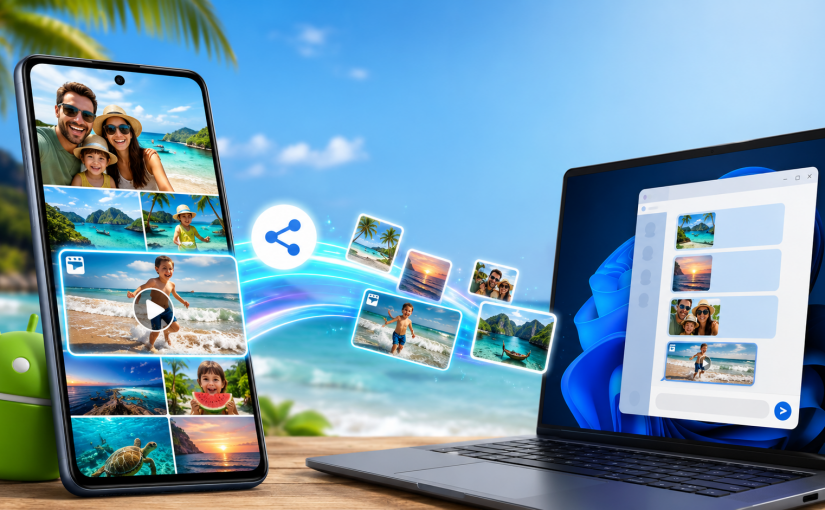
A phone and a Windows PC can sit on the same table, yet family photos still get handed to an internet service in another country just to move a few metres.
That route may be convenient when people are far apart. It makes less sense when the devices are in the same room, on the same Wi-Fi network, and the files contain private faces, children, homes, locations or travel moments.
TreeTalk Node can transfer files directly between Android phones, Android tablets and Windows PCs on the same reachable local network. It also supports private text chat, group messages, image previews and recorded voice messages in a push-to-talk style.
Android users can now choose between two public Google Play applications: TreeTalk Node Free for ordinary local sharing and messaging, and the separate TreeTalk Node Pro app for heavier workflows such as regular multi-file sending, larger files and unrestricted outgoing voice messages.
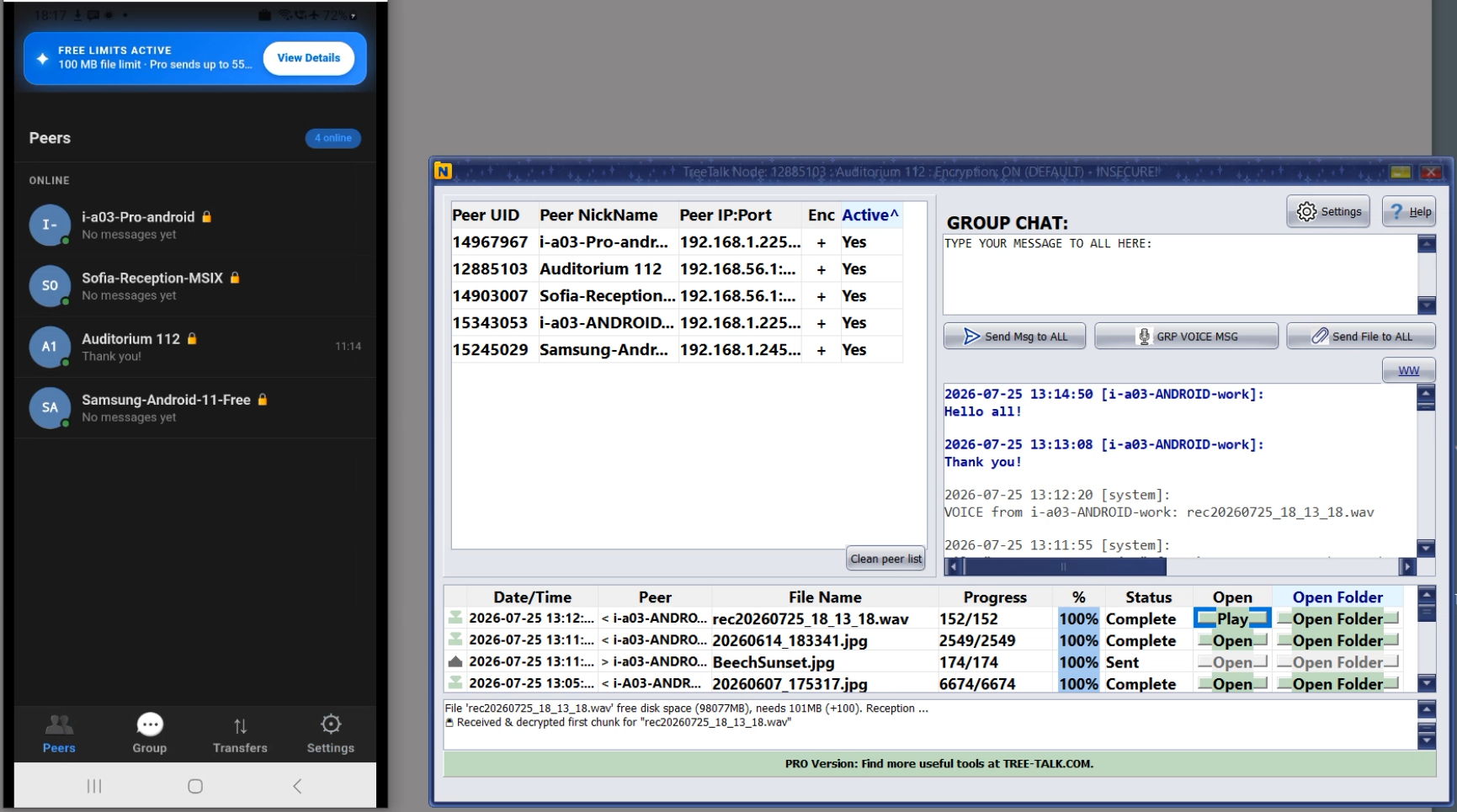
The Android and Windows applications do not look identical. They should not. The phone uses a familiar messenger-style interface, while the Windows version keeps a compact desktop layout. The important part is that the devices can discover one another and use the same local communication flow.
Android installation options and the current official downloads are also available on the TreeTalk Node Android download page.
Android-to-Windows and Android-to-Android file sharing
TreeTalk Node supports three everyday routes:
- Windows to Windows: exchange files and messages between PCs.
- Android to Windows: send photos, videos, documents and other files from a phone or tablet to a nearby PC, and receive files back from Windows.
- Android to Android: exchange files and messages between phones or tablets connected to the same reachable Wi-Fi, LAN, VPN or phone hotspot.
The transfer is peer to peer. The file moves between the participating devices instead of being uploaded to TreeTalk cloud storage and then downloaded again. No TreeTalk account is required for normal local use. Each user chooses a nickname that appears in the local peer list.
This is useful at home, on holiday, inside a small office, in a classroom, at an event, or anywhere several devices need to exchange content without depending on an external server.
How to send photos and videos from Android Gallery
The most natural Android workflow starts in the Gallery or file manager:
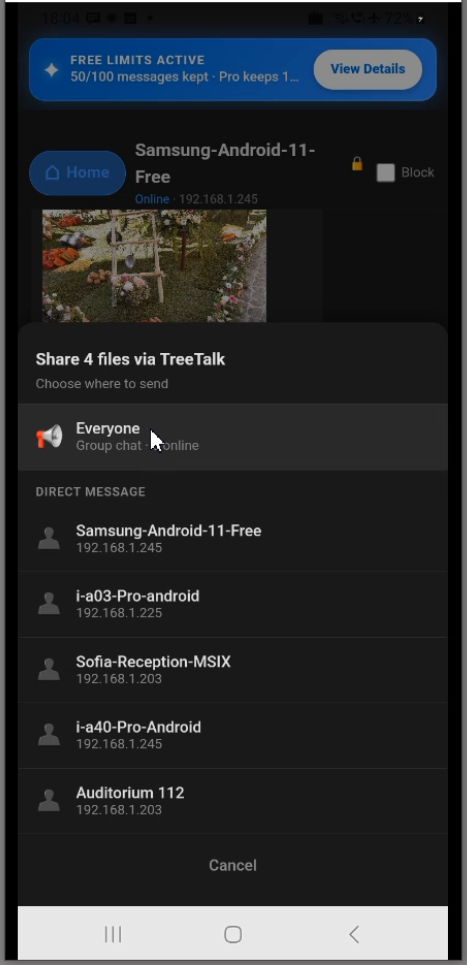
- Select a photo, video or other file. TreeTalk Node Pro also supports regular multi-file / multi-select sending.
- Tap the standard Android Share button.
- Choose TreeTalk Node from the Share menu.
- Select an active peer or the available group option.
- Start the transfer and follow its progress in the Transfers tab.
TreeTalk Node Free permanently supports ordinary single-file sending with an individual file-size limit of 100 MB. The Free edition also provides an evaluation allowance for selected multi-file workflows. TreeTalk Node Pro is intended for regular multi-file sending and supports individual files up to 55 GB, subject to Android device, operating-system, storage and network conditions.
You do not need to move the files into a special cloud folder first. You also do not need to open an email draft, create a temporary link or compress several images into an archive just to reach a nearby device.
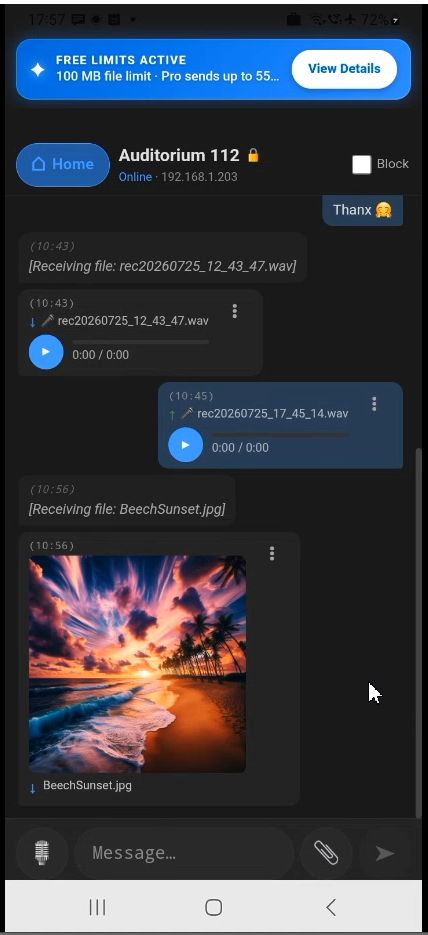
The Android feed can show previews of sent and received images, which makes it easier to see what has already arrived. The Transfers tab keeps a local history of incoming and outgoing files.
What happens on the Windows side
Run TreeTalk Node on the Windows PC and connect both devices to the same reachable network. The applications search for compatible peers automatically. When the Android nickname appears in the Windows peer list, either device can start the transfer.
On Windows, a user can drag a file onto the Android contact panel or directly to the nickname on the peer list. On Android, a user can select a file from the contact screen or use the Gallery / Files Share menu. The file history shows what was sent, what was received and where the received content was stored.
Windows users have two download choices:
- The Microsoft Store version for Windows 10 and Windows 11 offers the simplest installation route through the Windows store.
- The portable Windows version supports Windows 7 SP1 through Windows 11 and can run from a chosen folder without a traditional installer.
TreeTalk Node Free and Pro for Android use the same communication protocol and can communicate with compatible TreeTalk Node devices on Windows. Their interfaces, licensing and edition limits are different because the platforms are different.
More than file transfer: private chat and PTT-style voice
TreeTalk Node is not only a wireless file transfer app. Android and Windows users can also exchange local text and recorded voice messages.
The Peers tab is for individual contacts. Open a peer to see the private feed, send a file, write a message or hold the microphone button to record a voice message.
The Group tab provides one shared local feed. A message, voice note or file can be sent to the active group instead of one person. This can be practical for a family trip, a classroom, an operations team or a temporary network at an event.
TreeTalk Node Free includes an evaluation allowance for outgoing voice messages. TreeTalk Node Pro removes that Free-edition voice allowance for users who use recorded voice communication regularly.
Where AutoPlay is enabled, recorded voice messages can play automatically after arrival. This creates a push-to-talk style workflow similar to a walkie-talkie while still keeping the messages available for later playback.
Wi-Fi, LAN, VPN or a phone hotspot
Both devices must be able to reach one another on the same network. That network can be:
- home or hotel Wi-Fi, provided connected users are not isolated from each other;
- an office LAN;
- a user-configured VPN connecting approved locations;
- a phone hotspot or pocket Wi-Fi router, even when the hotspot itself has no Internet connection.
A phone hotspot is especially useful while travelling. One device creates the local network, the others join it, and TreeTalk Node discovers the reachable peers. Photos and videos can then move between the phones and a Windows laptop without leaving that temporary network.
Network configuration still matters. Guest Wi-Fi often isolates connected devices from one another. Corporate firewalls, VLAN rules or mismatched ports can also block peer discovery. The TreeTalk Node tutorial and troubleshooting pages cover the most common checks.
Privacy, encryption and the limits of “local”
Local transfer removes an unnecessary external storage step. TreeTalk Node does not need to store ordinary transferred files, messages or voice recordings on a TreeTalk cloud server for the participating devices to communicate.
Application-level encryption is available. For sensitive communication, participating devices should use matching encryption settings and a strong, unique passphrase. Share that passphrase through a separate trusted channel.
“Local” does not mean that every network is automatically trusted. A public hotel Wi-Fi network, for example, may contain unknown devices and restrictive router settings. For sensitive communication, use appropriate encryption and preferably a private hotspot, trusted LAN or properly configured VPN.
Where this workflow is useful
The same Android-to-Windows and Android-to-Android file-sharing flow fits both personal and professional situations:
- Families and travellers: collect holiday photos and videos on one laptop without creating cloud albums or messaging every file separately.
- Photographers and creators: move selected phone media to a Windows workstation over the local network.
- Small offices: send documents, photos and voice notes between work phones, tablets and PCs.
- Education: distribute materials between a teacher’s PC and student devices on the same classroom network.
- Hospitality and field work: send room photos, inspection images, forms or operational messages from mobile devices to a desktop workstation.
- Internet outages: continue local file transfer and messaging while the external connection is unavailable.
TreeTalk Node does not try to replace cloud storage when remote access and online archives are the real need. It removes the cloud from a simpler case: two or more reachable devices that only need a direct path.
Watch the Android-to-Windows demo and tutorial
This video was recorded during the earlier Android beta period, so its installation section shows the APK workflow used at that time. TreeTalk Node Free and TreeTalk Node Pro are now publicly available on Google Play.
The rest of the video demonstrates the core workflow: first launch, nickname and download-folder setup, peer discovery, file transfers in both directions, Gallery sharing, text chat, voice messages and the main Android tabs.
How to get TreeTalk Node
- Open the official TreeTalk Node Android download page for the current Android installation options.
- Install TreeTalk Node Free from Google Play.
- Get TreeTalk Node Pro from Google Play.
- Download the portable TreeTalk Node version for Windows.
- Install TreeTalk Node from Microsoft Store on Windows 10 or Windows 11.
- Open the Android tutorials and troubleshooting page.
- Open the Windows tutorials and troubleshooting page.
If you report a connection or transfer problem, include the Android device model, Android version, Windows version when applicable, connection type, and whether peer discovery and file transfer completed correctly.
Frequently asked questions
How do I transfer files from Android to Windows over Wi-Fi?
Connect the Android device and Windows PC to the same reachable Wi-Fi, LAN, VPN or phone hotspot. Run TreeTalk Node on both devices, wait for peer discovery, select the file in Android Gallery or a file manager, tap Share, choose TreeTalk Node and select the Windows peer.
Can I send several photos or videos from Android Gallery at once?
Yes, but the Android editions apply different limits. TreeTalk Node Pro supports regular multi-file / multi-select sending. TreeTalk Node Free includes an evaluation allowance for the multi-file workflow; after that allowance is exhausted, ordinary single-file sending remains available under the permanent Free limits.
Can TreeTalk Node transfer files between two Android phones?
Yes. Android-to-Android file transfer works when both phones run compatible TreeTalk Node editions and can reach each other on the same supported local network. A private phone hotspot can create that network when no router is available.
Does TreeTalk Node need an Internet connection?
No Internet connection is required for normal local file transfer, text chat or recorded voice communication. The devices still need a shared reachable network such as Wi-Fi, LAN, a user-configured VPN or phone hotspot.
Can Android and Windows exchange private chat and voice messages?
Yes. Compatible Android and Windows versions can exchange direct text messages, group messages and recorded voice messages over the local network. Available features and edition limits may differ between Android Free, Android Pro and Windows editions.
Are files uploaded to TreeTalk cloud storage?
No cloud upload is required for ordinary supported local transfers. Files are designed to move directly between reachable TreeTalk Node peers rather than being stored on a TreeTalk cloud server before reaching the recipient.
Can I send the same file to several phones?
Yes. TreeTalk Node supports group / broadcast communication between reachable peers. The sending and receiving limits of the editions running on the participating devices still apply.
What is the difference between TreeTalk Node Free and Pro on Android?
TreeTalk Node Free is the permanent free Android edition. It supports ordinary text messaging and single-file sending up to 100 MB, plus evaluation allowances for selected multi-file and outgoing voice workflows.
TreeTalk Node Pro is a separate paid Google Play application. It supports regular multi-file / multi-select sending, unrestricted outgoing voice messages, deeper local chat and transfer histories, and individual files up to 55 GB, subject to device, operating-system, storage and network conditions.
TreeTalk Node Pro is a one-time Google Play purchase rather than a recurring software subscription. Installing Pro does not unlock or replace the Free app.